· Tim Moore · 9 min read
Case Study: Using a trust boundary for safer AI integration
Email triage is one of the most useful applications of AI. It is also one of the riskiest. This case study describes how implementing a trust boundary makes an AI assistant useful without giving it more access, authority, or data than it really needs.
The appeal is obvious. A good AI assistant could triage incoming messages, spot what needs attention, draft replies, flag follow-ups, and move routine admin out of the way. For people whose work lives in their inbox, that is real leverage.
But email is also where private and operationally sensitive material accumulates: password resets, authentication codes, invoices, contracts, client conversations, recruitment threads, banking alerts, attachments, calendar details, and half-finished thoughts.
So the interesting question is not simply: can an AI assistant connect to email? The better question is: how do you make that connection useful without giving the assistant more access, authority, or data than it really needs?
This was the key question for me when I decided to implement a personal productivity assistant using OpenClaw. My answer was to implement a trust boundary. I’m using Apple Mail which integrates beautifully into my Apple ecosystem, but it doesn’t (yet) come with any built-in features to allow safe integration with an external AI assistant. So, I decided to design and build a “Mail Agent Bridge”. It is a small app that safely connects Apple Mail on my Mac to my remote assistant based on OpenClaw. The point was not to make the AI all-powerful. The point was to create a narrow, auditable boundary where the assistant can help while the most sensitive parts of the mailbox remain local and under deterministic control.
In applied AI, integration design is governance design.
Why A Bridge Is Necessary
Apple Mail is a local application. My email is already on my Mac, managed through the tools and permissions of macOS. A remote AI assistant does not naturally have a safe way to interact with it.
One commonly used approach is to expose the mailbox directly: give an agent broad access to messages, attachments, and actions, then rely on prompting and model behaviour to keep things sensible. That is a very flexible approach, but it introduces a plethora of security issues. It is certainly not an architecture that should be if an external model is used. Even if hosting a local model, confidential and privilidged data could leak out into other systems.
Another approach would be to build a dedicated bridge that decides what the assistant is allowed to see and what it is allowed to ask for. That is the pattern I chose.
The Mail Agent Bridge separates three concerns:
- What is present in the real mailbox.
- What is safe enough to disclose to the assistant.
- What actions the assistant may propose for local execution.
The bridge is deliberately not a generic “AI has access to my email” system. It is a controlled workflow. The local Mac agent reads Apple Mail, classifies and sanitises messages, publishes only safe summaries to a remote API, and keeps the private mapping to real Apple Mail messages on the Mac.
The assistant never gets raw mailbox access. It sees only the sanitised records the Mac bridge has already decided are safe enough to disclose.
The Core Rule
The core rule is simple:
The remote assistant only sees email records that the Mac bridge has already classified, sanitised, and published with a safe ID.
That rule drives the whole architecture. The Mac is not just a client in this design. It is the trust boundary. It owns the raw mailbox, private message identifiers, local policy configuration, and final execution decision.
The remote side stores sanitised records and action requests. It does not receive raw Apple Mail IDs, unredacted message bodies, attachment contents, AppleScript access, or shell access.
At a high level, the system looks like this:
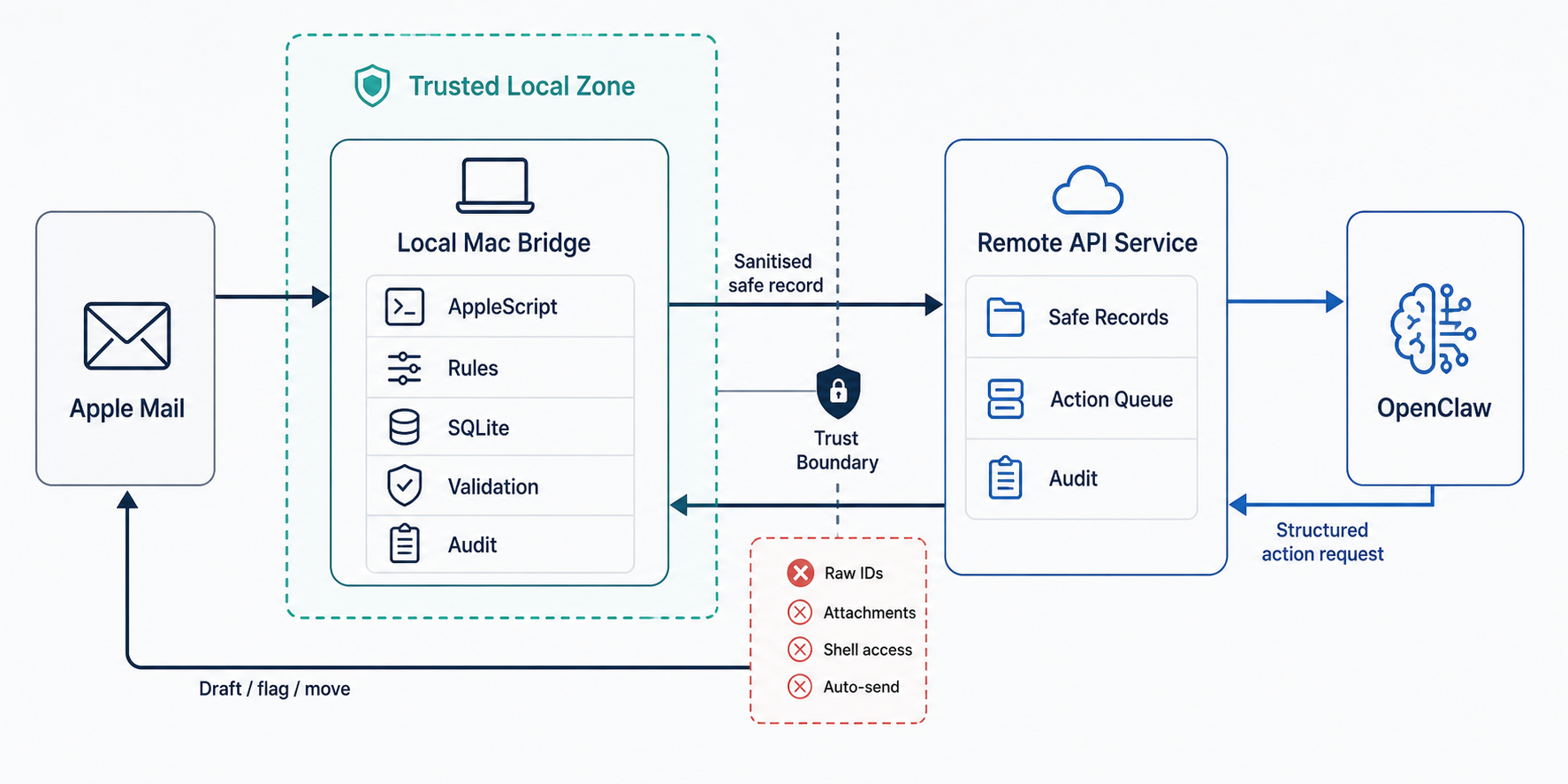
The direction of authority matters. The AI can propose an action. The local bridge validates and executes.
How The Bridge Works
The system has two main components. The first is a local macOS bridge, which is implemented with a lightweight app. It reads recent messages from configured Apple Mail mailboxes using AppleScript, applies deterministic rules, redacts content where appropriate, and stores local audit and disclosure state in SQLite.
The second is a remote server running on the OpenClaw host. For security reasons, I’ve chosen not to run OpenClaw on my Mac, but this architecture would equally support a locally installed assistant. The server receives sanitised safe-mail records over a secure API, exposes those records to OpenClaw via the API, accepts structured action proposals, and queues them for the Mac to pick up.
A typical cycle works as follows. The local bridge wakes up every minute and scans recent configured mailboxes. For each message, the bridge first looks at metadata such as sender, subject, mailbox, and received time. Rules defined in a local configuration file decide whether the message is blocked, potentially safe, or needs deeper inspection. This metadata-first pass matters because some messages should never have their body fetched for disclosure at all.
If a message is potentially safe, the bridge may fetch the body locally and classify it again. Blocked senders, blocked domains, sensitive keywords, or attachments can prevent disclosure.
For messages that pass the policy, the bridge creates a safe record: a generated safe email ID, basic metadata, a sanitised snippet, category information, redaction notes, and an expiry time. The raw Apple Mail ID remains local. The idea is to be able to pass enough information to the remote AI assistant about the email for it to determine an action, but without exposing the full email.
The remote API stores that safe record. OpenClaw can then decide whether anything useful should happen: flag it, mark it read, move it to a folder, draft a reply, or take no action.
But OpenClasw does not execute those actions directly. It submits a structured action request. The Mac bridge later checks that the safe email ID is known locally, validates the request, rejects anything malformed or unsafe, and only then executes the allowed operation in Apple Mail.
For the current implementation, replies purposely stop at draft creation. The system can help write a reply, but I still review and send it from Apple Mail. The system will later be enhanced to allow controlled access to sending email on my behalf. This highligts another advantage implementing a trust boundary - features can be enabled gradually and thoughtfully over time.
The Security Model
A lot of AI security work is really permission design. The Mail Agent Bridge uses a few simple principles.
Raw data stays local by default. The assistant sees summaries, not the mailbox. Actions are typed: a flag request needs a valid flag colour, a move request needs a target folder, and a draft reply is distinct from sending a reply. Scripts, attachment fetches, raw-mail reads, and automatic sends are hard-blocked.
Authority remains local. The Mac bridge keeps the private mapping from safe IDs to real messages, and unknown, expired, or undisclosed safe IDs are rejected. The system is also auditable: the local bridge records classification decisions, disclosures, blocked messages, rejected actions, and executed actions, while the server records safe-mail events, action requests, and security rejections.
Finally, the system uses role separation. The Mac role can publish safe mail and report action results. The OpenClaw role can read safe mail and create action requests. Admin access is separate.
The result is not perfect security. No useful integration has zero risk. The result is a smaller and more explicit risk surface.
What This Says About Applied AI
This pattern is highly relevant to business AI systems. As organisations move from AI demos to operational workflows, the problem changes. An applied AI system has to answer harder questions:
- What data should the model never see?
- Which actions are allowed, and under what conditions?
- Where is the approval boundary?
- What gets logged?
- How are mistakes detected and reversed?
- Which parts should be deterministic rather than model-driven?
In this bridge, classification and redaction are deliberately deterministic. The AI is not asked to decide whether it should be allowed to see a message. The same applies to actions: it can propose a move, a flag, or a draft, but it cannot smuggle AppleScript into a payload, ask for an attachment, or send a reply just because the text looks good.
This is the difference between building an AI feature and designing an AI-enabled system. The feature is “AI helps me handle email.” The system is the boundaries, queues, policies, logs, and validations that make the feature usable in the real world.
MVP Boundaries Are A Security Tool
One of the most useful decisions in this project was deciding what not to build in V1. The bridge does not automatically send replies, expose attachments, provide a generic Apple Mail remote-control API, or make OpenClaw responsible for deciding which private data it should receive.
Drafting a reply is useful. Automatically sending that reply is a different level of authority. Moving a safe message to a configured folder is useful. Open-ended mailbox control is a different risk category.
Good MVP boundaries let a system deliver value while postponing higher-risk capabilities until there is enough confidence to justify them.
The Business Lesson
For businesses adopting AI, the strategic question is rarely “can we connect a model to this system?”
Usually, the model can be connected somehow. The harder question is whether the connection respects the business context. A recruitment workflow has different risks from a finance workflow. A customer support inbox has different disclosure rules from an executive inbox. The architecture should reflect those differences.
That is why I like bridge patterns for applied AI. They force the team to define the boundary explicitly:
- The source system remains authoritative.
- The AI receives a purpose-built view of the data.
- Actions are structured and validated.
- Sensitive operations require stronger approval.
- Logs are available for review and tuning.
This is where technical and commercial judgement meet. A system that is too permissive may be exciting in a demo but unacceptable in a real business. A system that is too locked down may be safe but useless. The work is finding the narrow channel where AI creates value without inheriting unnecessary power.
The Mail Agent Bridge started with a simple personal need: let a remote assistant help me deal with email without giving it direct access to my inbox.
The resulting architecture is intentionally modest. A local Mac bridge reads and filters. A remote API stores only safe records. OpenClaw proposes structured actions. The Mac validates and executes. Replies stop at drafts.
The safest applied AI systems are not the ones that trust the model most. They are the ones that make trust explicit, bounded, and reviewable.
That is the kind of architecture businesses need as they move from AI experiments to real workflows: not just clever models, but careful boundaries around what those models can see and do.
- Applied AI
- AI governance
- Email workflows